Other cookies are configurable.

Shipping Software Core Concepts
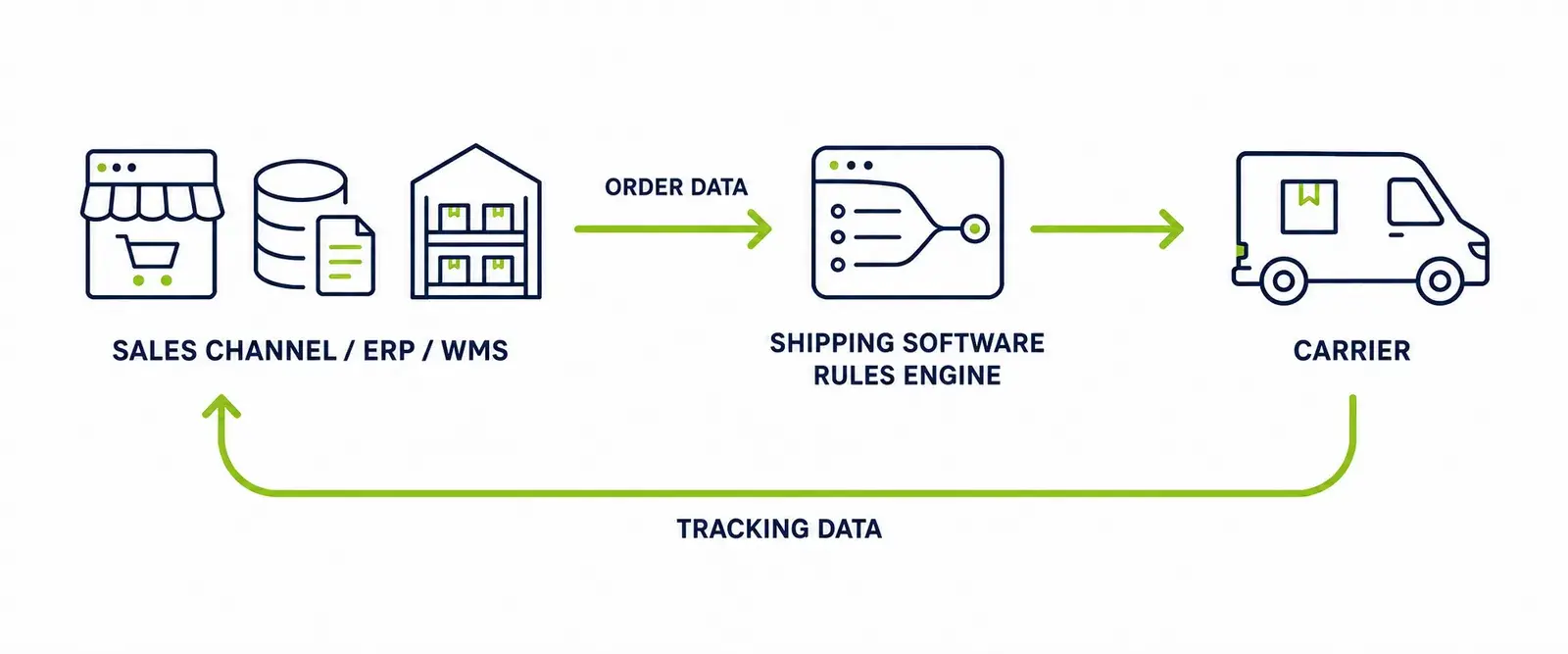
Shipping software sits between the systems that take orders and the couriers that deliver them. It receives order data from an ecommerce platform, ERP, order management system or warehouse management system, applies shipping rules to decide how each order should be sent, books the shipment with the chosen carrier, produces the label and any required documents, and returns tracking data to the systems that need it.
Shipping Software Core Concepts is a reference library published by Shipster, the multi-carrier shipping software from Oddsphere Limited. It explains the terminology and mechanics of shipping software in plain language: how orders become shipments, how shipping rules and carrier integration software work, and what to look for when moving beyond a basic ecommerce shipping application and what Shipster supports.
This library uses carrier and courier interchangeably. Carrier is the standard term in shipping software and in phrases such as multi-carrier and carrier integration; courier is the everyday term for the same delivery companies in the UK.
What this technical reference library covers
The library explains the concepts that shipping software is built on. It is written for people who work with orders, parcels and couriers every day but may not have worked with dedicated shipping software before, and for experienced operators comparing how different systems handle the same problems. It is intended particularly for:
- Ecommerce businesses and retailers despatching their own orders
- 3PLs shipping on behalf of multiple merchants or brands
- Warehouse operators and despatch teams
- Operations teams and ecommerce managers
- People evaluating shipping software for the first time
- Businesses that have outgrown a basic ecommerce shipping application
Every page follows the same pattern: a direct definition first, then how the concept works, worked examples, edge cases, and finally a factual note on whether Shipster supports it. Each page carries a visible last-reviewed date and update notes.
How are orders linked to couriers as shipments?
An order becomes a shipment when shipping software takes the order data, decides how it should travel, books it with a carrier and produces the label. The order is the commercial record of what was bought; the shipment is the operational record of how it is delivered.
The sequence below is common to almost all shipping software, whichever platforms and couriers are involved:
- An order is placedThe order originates in an ecommerce platform such as Shopify, a marketplace, an ERP, an order management system (OMS) or a warehouse management system (WMS).
- Order data reaches the shipping softwareAn integration or API passes across the details the shipping decision needs: delivery address, items, weights, dimensions, order value and the delivery method the customer chose.
- The order is evaluatedShipping rules check the order against conditions such as destination, weight or value.
- A carrier and service are selectedThe rules resolve to a specific courier and a specific service, for example a next-day tracked service rather than just a courier name.
- A shipment record is createdThe order, or part of it, becomes a shipment with its own reference. One order can produce more than one shipment.
- Labels and documents are generatedThe despatch label prints, along with any required paperwork such as customs documentation for international parcels.
- Shipment data is sent to the carrierThe booking and manifest data reach the courier's systems so the parcel is expected and priced correctly.
- Tracking and status data returnTracking references and delivery events can flow back to the connected platforms, so other systems and the customer see shipment progress.
Core concept index
The library is organised into concept areas. Two are available now; others are in preparation and listed so you can see the intended shape of the resource. What is published here is a selection — the concepts and rules people evaluating shipping software ask about most — rather than a complete catalogue of what shipping software, or Shipster, can do. Shipster supports many more rule types and variations than this library lists.
Basic Shipping Rules
Rules built on a single, straightforward condition — weight, destination, order value, SKU — that automate routine carrier and service decisions.
Advanced Shipping Rules
Layered logic for the exceptions that multiply as an operation scales: multiple simultaneous conditions, priorities, exclusions, fallback carriers, shipment splitting and rules that draw on data from more than one system.
Labels and despatch documents
How despatch labels, customs paperwork and courier documentation are generated and what data they require.
Tracking and shipment data
How tracking references and delivery events move between couriers, shipping software and connected platforms.
International shipping and customs data
The data behind cross-border shipping, including customs declarations and schemes such as IOSS, EORI, the Windsor Framework and ICS2.
Integrations and data exchange
How APIs, webhooks and platform integrations keep order, shipment and tracking data consistent across systems.
How do shipping rules work?
A shipping rule is an instruction that tells shipping software what action to take when an order meets particular conditions. Rules replace the manual judgement a despatch operator would otherwise apply to every order.
Every rule has the same anatomy:
- Condition — the test applied to the order. Common inputs are destination, weight, order value, SKU or product type, the delivery method the customer selected, parcel dimensions and carrier or service availability.
- Action — what the software does when the condition is met: select a service, exclude a service, switch carrier account, add a signature requirement, flag the order for review.
- Outcome — the shipping result: the carrier, service and documentation the shipment actually gets.
When more than one rule exists, rule order or priority decides which applies first and what happens when rules disagree. Well-ordered rules mean the software makes the same decision a good despatch operator would make, automatically and consistently, on every order.
An example in plain language: if an order weighs more than 20 kg, exclude services that only accept parcels up to 20 kg and select an eligible heavy-parcel service instead.
The library splits rules into two levels. Basic Shipping Rules covers single-condition rules that automate routine decisions. Advanced Shipping Rules covers layered logic — multiple conditions, priorities, fallbacks and shipment splitting.
Shipping APIs and integrations
An integration is a maintained connection that moves data between two systems automatically. In shipping, integrations carry order data into the shipping software and send shipment, label and tracking data back out.
Several kinds of connection are involved:
- APIs (application programming interfaces) are the technical mechanism most integrations use: one system requests or submits data from another in a structured format.
- Webhooks push data the moment something happens — a new order, a printed label, a delivery scan — rather than waiting to be asked.
- Ecommerce and marketplace integrations bring orders in from platforms such as Shopify or Amazon.
- WMS and ERP integrations connect warehouse systems such as Descartes Peoplevox or Linnworks, so picking, packing and despatch stay in step.
- Carrier integrations connect to each courier's systems to book shipments, generate compliant labels and retrieve tracking.
Data flows in both directions. Orders, weights and addresses flow towards the courier; shipment references, label images, manifests and tracking events flow back. When people compare shipping software, much of what they are really comparing is the breadth and quality of these integrations.
What is carrier integration software?
Carrier integration software connects a business's ordering and warehouse systems to courier networks, so shipments can be booked, labelled and tracked across many couriers from one place — without building and maintaining a separate connection to each courier in-house.
Building a single courier integration directly means working with that courier's API, keeping up with its changes, and repeating the work for every additional courier and service. Carrier integration software absorbs that work: the connections already exist and are maintained centrally, and shipping rules decide which of them each order uses.
Shipster is carrier integration software in this sense. It maintains integrations with more than 150 couriers, is an official Royal Mail third-party partner, and new courier services can be added on request — the couriers listed on the Shipster site are examples of what is supported, not a limit. See the list of couriers for current examples.
What type of business is Shipster best suited for?
Shipster is designed for operational shipping environments rather than occasional parcel sending. It is most relevant to businesses despatching through a warehouse or a structured fulfilment process, where several people ship every day and the cost of a wrong carrier decision is multiplied across hundreds or thousands of parcels.
Factually, the fit looks like this:
- Shipster has a minimum of four licences, so it assumes a despatch operation rather than a single occasional user.
- It is designed to scale as parcel volumes grow, and can run across more than one warehouse.
- It is appropriate where a business needs multiple couriers, integrations with ecommerce or warehouse platforms, or configurable shipping logic.
- There is no per-label charge; the licence model does not penalise higher volumes.
| Type of sender | Typical shipping pattern | Shipster fit |
|---|---|---|
| Very small or occasional sender | A few parcels a week, one courier, labels bought individually. | Not the intended use case. Shipster's four-licence minimum and warehouse focus mean simpler tools usually serve this pattern better. |
| Growing ecommerce operation | Daily despatch, one or two couriers, orders from an ecommerce platform, manual carrier decisions starting to cost time. | A fit once despatch runs as a daily process and a second courier, an integration or shipping rules would remove manual work. |
| Warehouse-based retailer | Structured despatch through a warehouse, multiple couriers and services, WMS or ERP in place, high order volumes. | Core use case. Multi-carrier booking, shipping rules and platform integrations are the day-to-day workload Shipster is built for. |
| 3PL or multi-warehouse business | Shipping for multiple merchants or brands, several sites, different carrier accounts and rules per client. | Core use case. Merchant-specific rules, carrier-account selection and multi-warehouse logic are covered under Advanced Shipping Rules. |
Basic and advanced shipping rules
Basic Shipping Rules
Commonly used rules based on straightforward order or shipment conditions: weight, destination, postcode, order value, SKU, delivery method and similar single tests. Includes an organised index of individual rules with definitions and use cases.
Advanced Shipping Rules
Rules that combine multiple conditions and layered logic: AND/OR combinations, exclusions, priorities, fallback carriers and services, shipment splitting, and rules that use data from more than one connected system. As a business scales, exceptions multiply — advanced rules absorb them automatically, without adding complexity for the person despatching. Includes a layered worked example and an interactive demonstrator.
Planned Core Concepts categories
The categories marked Planned in the concept index above — labels and despatch documents, tracking and shipment data, international shipping and customs data, and integrations and data exchange — will be added to this library over time, following the same definition-first format as the shipping rules pages. If a concept you need is not yet covered, the Shipster platform overview describes the product side, or you can ask directly.
Common questions
What does shipping software do?
Shipping software receives order data from ecommerce platforms, marketplaces, ERPs and warehouse systems, applies rules to choose the right courier and service for each order, produces the labels and documents, sends the booking to the courier and returns tracking data. It replaces manual courier decisions with consistent, automatic ones.
What is carrier integration software?
Carrier integration software connects a business's ordering and warehouse systems to courier networks, so shipments can be booked, labelled and tracked across many couriers from one place without building a separate connection to each courier in-house.
What is the difference between shipping software and a courier's own booking tool?
A courier's own tool books shipments with that courier only. Shipping software sits above multiple couriers, applies your own rules to every order and selects the best eligible courier and service each time, so you are not tied to one network's tools.
Do I need shipping software if I only use one courier?
Not always. With one courier, low volumes and no automation needs, the courier's own tools may be enough. Shipping software earns its place when despatch runs daily through a warehouse, more than one courier or integration is involved, or manual decisions are costing time and errors.
How does shipping software decide which courier delivers an order?
Through shipping rules. Each rule tests order data — destination, weight, value, contents or delivery method — and selects or excludes carrier services accordingly. Rule priorities decide the outcome when several rules apply to the same order.
What type of business is Shipster designed for?
Shipster is designed for operational shipping environments — businesses despatching daily through a warehouse or structured fulfilment process, often with multiple couriers, integrations or warehouses. It has a minimum of four licences and no per-label charge.
Editorial and technical review
- Published by
- Shipster, the multi-carrier shipping software from Oddsphere Limited, Manchester, UK. This library is product documentation-style content from a software vendor, not independent consumer advice or regulatory guidance.
- Last reviewed
- 24 July 2026
- References
- GOV.UK — Get an EORI number; GOV.UK — The Windsor Framework; European Commission — Taxation and Customs Union, for IOSS and ICS2. Individual couriers publish their own current service specifications in their service guides.
- Corrections and update notes
- Added the carrier and courier terminology note — 24 July 2026.